








Wavell 4 Aero
Frequently Asked Questions
Thank you so much for using Wavell 4 Aero. Technology can sometimes be a bit of a hassle, but fortunately, these issues can usually be resolved quickly and easily.
What does “open-ear” mean?
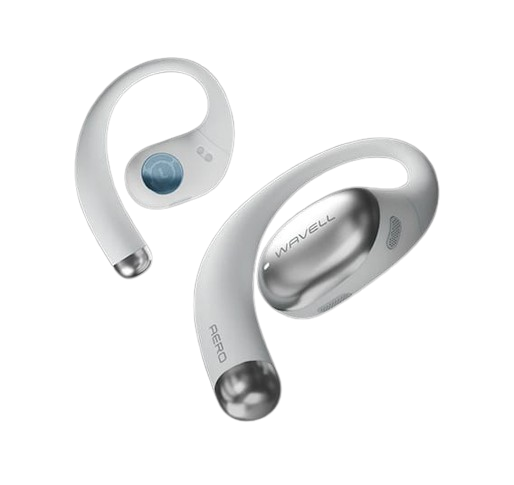
"Open-ear" means that the earbuds rest on the outside of your ear, so you can still hear what's going on around you. This is especially great for running, biking, and outdoor workouts.
Does the Wavell 4 have Aero Active Noise Cancellation (ANC)?
No. The Aero is designed to keep you aware of your surroundings, so it doesn't “shut out the world” the way in-ear headphones do.
How do I put them on correctly?
- Position them so they sit securely around your ear, and adjust the angle so the sound is directed naturally toward your ear.
- The right “sweet spot” provides significantly better sound and a more secure fit.
Can other people hear my music?
Open-ear headphones may leak a little sound at high volumes. If you want to minimize sound leakage, turn the volume down a bit and make sure they're positioned correctly.
Can I wear them while working out and sweating?
Yes, Aero is designed for active use and is water- and sweat-resistant. Feel free to wipe them down after your workout, and let them dry completely before putting them back in the case.
I can't find my manual
Can I connect to two devices at the same time?
Yes, Aero supports multipoint. This feature is enabled and controlled through the Wavell Connect app.
What can I do if the touch function isn't working?
Try the following:
1. Make sure you're touching the correct touch area.
2. Keep your hands dry—damp hands can affect touch sensitivity.
3. Reset the headphones.
How do I reset the Wavell 4 Aero?
To reset the headphones, do the following:
1. Disconnect Bluetooth on your device(s).
2. Place the earbuds in the case. Press and hold the function button for 10 seconds,
until the earbuds have flashed red 5 times.
The headphones have now been restored, and you can reconnect to them.